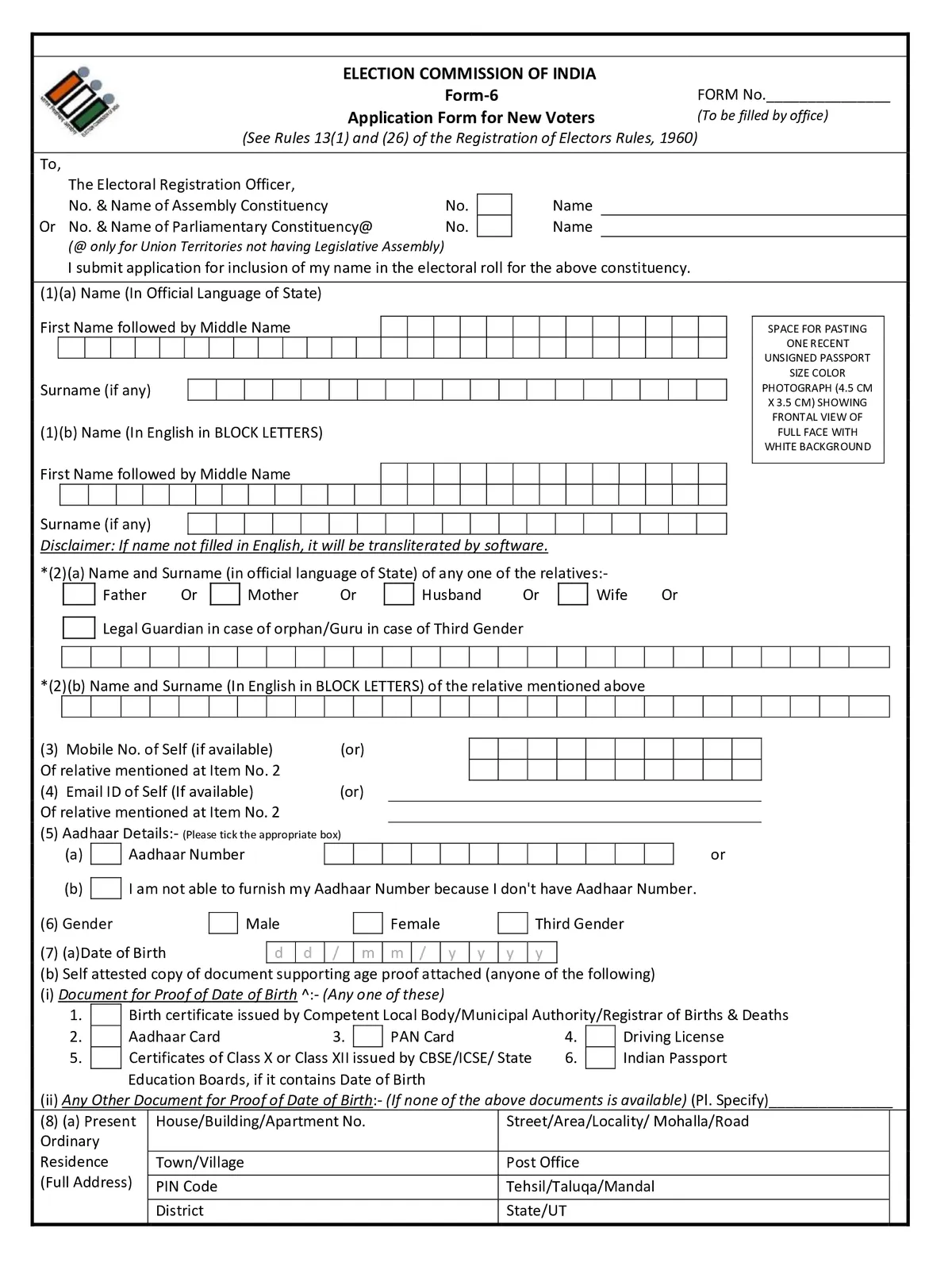
Voter Form 6 for New Registration - Summary
Voter Form 6 is the official application form issued by the Election Commission of India (ECI) for the inclusion of a name in the Electoral Roll. It is primarily intended for Indian citizens who have reached 18 years of age (first-time voters) or prospective electors qualifying on upcoming qualifying dates, as well as eligible citizens wishing to register for a new Voter ID card in their assembly constituency. By submitting Form 6, applicants get their name included in the voter list and receive an Elector’s Photo Identity Card (EPIC / Voter ID Card).
Under the updated Election Commission guidelines, young citizens no longer need to wait until January 1st to apply. The ECI provides four qualifying dates in a calendar year-January 1, April 1, July 1, and October 1-enabling eligible youth turning 18 to submit advance applications seamlessly online or offline.
Voter Form 6 – Highlights
| Particulars | Details |
| Form Name | Voter Form 6 (Application for Inclusion of Name in Electoral Roll) |
| Issuing Authority | Election Commission of India (ECI) |
| Target Beneficiary | First-time voters (aged 18+) & un-enrolled eligible Indian citizens |
| Purpose | New Voter ID registration & entry into the Electoral Roll |
| Qualifying Dates | 1st January, 1st April, 1st July, and 1st October |
| Application Mode | Online (voters.eci.gov.in / Voter Helpline App) & Offline (BLO / ERO Office) |
| Application Fee | Free of Cost (₹0) |
| Key Documents Required | Proof of Age (DoB), Proof of Ordinary Residence, Recent Passport Photograph |
| Official Portal | voters.eci.gov.in |
| Toll-Free Helpline | 1950 (Voter Helpline) |
Documents Required for Voter Form 6
To successfully apply for a new Voter ID card using Form 6, applicants must submit self-attested copies (or upload clear scanned copies/photos online) of the following mandatory documents approved by the Election Commission of India:
1. Proof of Date of Birth (Age Proof)
Any one of the following valid documents showing the applicant’s name and exact date of birth:
- Birth Certificate issued by the Municipal Authority or Registrar of Births & Deaths
- Aadhaar Card
- PAN Card
- Driving License
- Class 10 (SSLC/Matriculation) or Class 12 Certificate / Marksheet having date of birth
- Indian Passport
2. Proof of Ordinary Residence (Address Proof)
Any one of the following valid documents in the name of the applicant or their parent/spouse/guardian:
- Water, Electricity, or Cooking Gas connection bill for that address (not older than 1 year)
- Aadhaar Card
- Current passbook of Nationalized / Scheduled Bank or Post Office
- Valid Indian Passport
- Registered Rent Agreement / Lease Deed (with photograph)
- Registered Sale Deed or Revenue Department’s Land Revenue Record (Khasra/Khatauni)
3. Recent Passport Size Photograph
- One recent passport-sized color photograph (4.5 cm x 3.5 cm) showing full face against a light or white background (maximum size 2 MB in JPG/JPEG format for online upload).
4. Optional / Additional Details
- Aadhaar Number: Voluntary provision for identity authentication under Section 23(2) of the RP Act. If you do not possess an Aadhaar card, you can submit the attached declaration.
- Disability Certificate: Issued by a competent medical authority (if applicant has a benchmark disability and wishes to avail accessibility support during elections).
- Family Member’s EPIC: Existing Voter ID card number of father/mother/spouse residing in the same household (helps map your polling booth accurately).
How to Fill Voter Form 6 (Step-by-Step Guide)
Eligible citizens can fill and submit Voter Form 6 either online through the Election Commission’s portal or physically at their nearest electoral office. Follow the step-by-step instructions below:
Method 1: How to Fill Voter Form 6 Online
- Visit the Official Portal: Open your web browser and go to the official ECI Voters’ Services Portal at voters.eci.gov.in or install the Voter Helpline App from Google Play Store or Apple App Store.
- Sign Up or Log In: Click on Sign-Up if you are a new user. Enter your mobile number, email ID, and captcha to receive an OTP and create a password. If already registered, click Login.
- Select Form 6: On the dashboard, click on “Fill Form 6 – New registration for general electors”.
- Select State, District & Constituency (Section A): Choose your State, District, and Parliamentary / Assembly Constituency where you ordinarily reside.
- Enter Personal Details (Section B): Enter your First Name, Surname, and upload a recent passport-sized color photograph (JPEG/PNG up to 2 MB).
- Enter Relative Details (Section C): Select relation type (Father / Mother / Husband / Wife / Legal Guardian) and enter their name and surname.
- Provide Contact Details (Section D): Enter your mobile number and email address. You will receive OTP verification and regular application updates on this number.
- Enter Aadhaar Details (Section E): Enter your 12-digit Aadhaar number, or select the declaration checkbox if you do not possess Aadhaar.
- Select Gender & Date of Birth (Sections F & G): Choose your gender and enter your exact Date of Birth. Choose the supporting Age Proof document type from the dropdown and upload a scanned copy (up to 2 MB).
- Enter Present Residential Address (Section H): Fill in your House/Door/Flat number, Street/Locality, Town/Village, Post Office, PIN code, Tehsil/Taluka, and District. Select the Address Proof document from the list and upload its scanned copy.
- Disability & Family Member Details (Sections I & J): Specify any category of disability if applicable. Mention the name and EPIC number of an existing family member already enrolled in the same electoral roll.
- Complete the Declaration (Section K): Enter your native town/village, state, district, and since when (Month & Year) you have been ordinarily residing at the given address. Confirm that you have not applied or been registered elsewhere.
- Preview & Submit: Enter the captcha code and click Preview and Submit. Review all details carefully. Once verified, click Submit.
- Save Reference Number: Note down the generated Reference ID / Application Tracking Number to check your application status.
Method 2: How to Fill Voter Form 6 Offline
- Download & Print Form: Download the Voter Form 6 PDF using the link on this page or collect a free hard copy from your local Booth Level Officer (BLO), Electoral Registration Office (ERO), or Voter Facilitation Centre (VFC).
- Fill in Details: Use a blue or black ballpoint pen to fill in the form neatly in capital letters in English or the official regional language.
- Affix Photograph: Paste a recent passport-sized color photograph (4.5 cm x 3.5 cm) in the space provided on the top-right corner.
- Attach Document Copies: Enclose self-attested photocopies of your valid Age Proof document and Residence/Address Proof document.
- Sign Declaration: Read the declaration at the end of the form, enter the date and place, and put your signature or thumb impression.
- Submit to BLO / ERO: Hand over the completed form along with attached photocopies to your designated Booth Level Officer (BLO) or the Assistant Electoral Registration Officer (AERO) office.
- Collect Acknowledgment: Make sure to obtain the stamped acknowledgment slip containing the application serial number for tracking.
How to Track Voter Form 6 Application Status
Once you submit Form 6, your application undergoes physical field verification by the local Booth Level Officer (BLO). You can track the progress of your application online:
- Visit the official portal at voters.eci.gov.in/track.
- Enter your Reference ID received upon form submission.
- Select your State from the dropdown menu and click Submit.
- The screen will display the current status: Submitted → Appointed BLO → Field Verified → Accepted / Rejected. Once accepted, your EPIC number is generated and your digital e-EPIC can be downloaded instantly.
Download Voter Form 6 in Other Languages: You can also access Voter Form 6 in regional languages including Hindi, Bengali, Assamese, and Marathi.