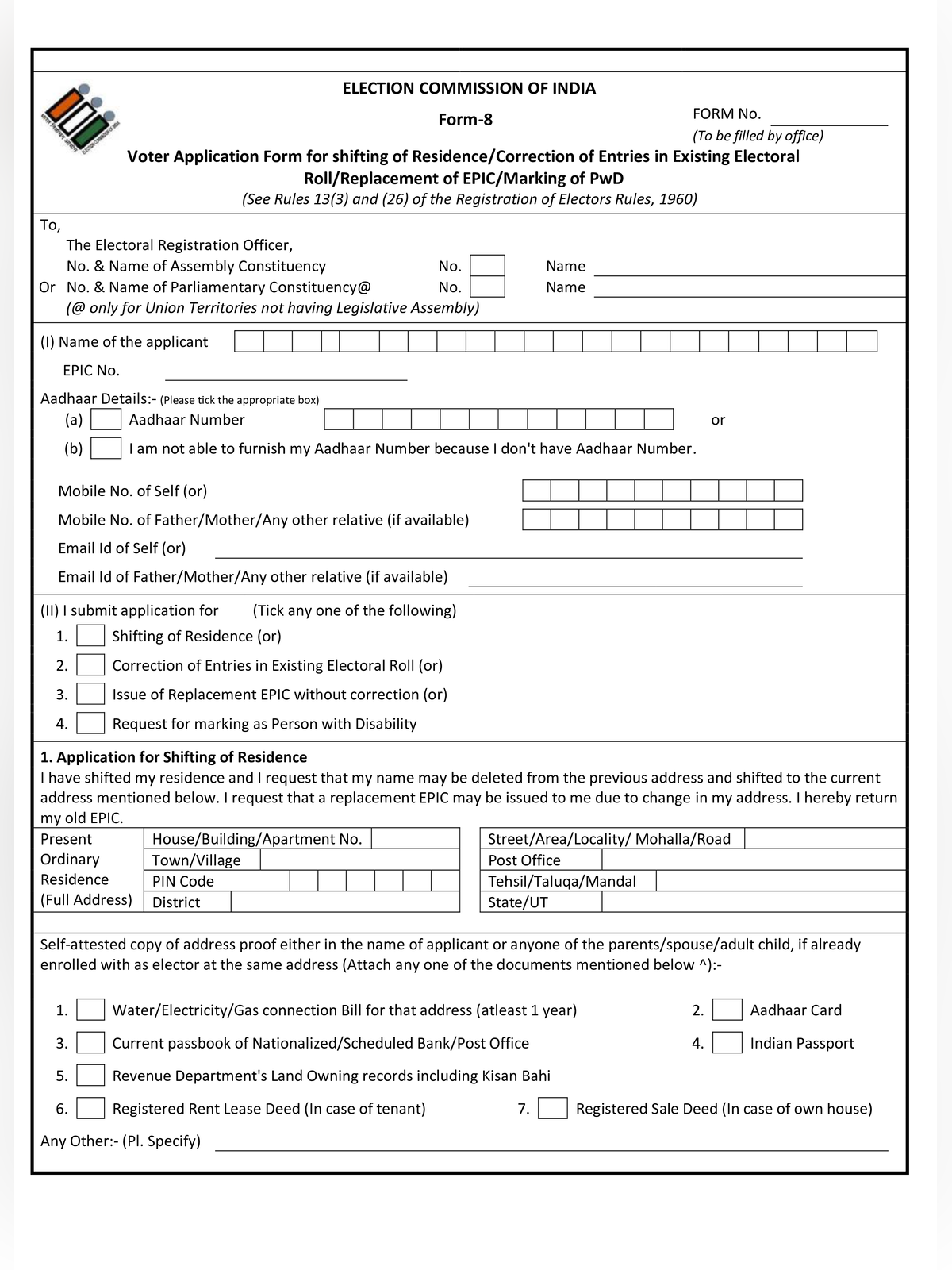
Voter Form 8 - Summary
Voter Form 8 PDF is used to update/change the address or correction of electoral roll entries in voter ID card and this form issued by the Election Commission of India (ECI). Registered voters use this form when changing addresses across or within assembly constituencies, fixing errors in name, age, or relation details, or requesting a new voter card.
This 3-page application is available in Hindi and English. Voters can submit the printed paper form to their local Booth Level Officer (BLO) or complete the process online on voters.eci.gov.in.
How to Fill Voter ID Correction Form 8 Online – (How to Correct/Update Voter ID Online)
Step 1: Go to the CEO Official Website, voters.eci.gov.in
Step 2: On the homepage of the website, you have to click on “Form 8” under the “Correction Of Entries” section

Step 3: To fill voter id correction form you have to log in enter the registered mobile number and enter the captcha code then OTP received to verify to login. If not then click on Sign Up button to registered yourself.

Step 4: On the next page you have to click on “Form 8” and select the Self option and your EPIC number be displayed then click on submit. After that, your record will be displayed.

Step 5: Now you have 4 option from which you want to make correction in Voter ID card.
- If your Residence is shifted Within Assembly Constituency or Outside Assembly Constituency
- Second option is for personal information like to update (change) mobile number, Name, Father name and other details change.
- In this option you can get your Voter ID card with existing details like your old voter ID card stolen or damage.
- The last one option is used by the PWD applicants who want to update handicapped certificate with Voter ID card.

Step 6: On the next page Form 8 will be displayed with your details as the screenshot shown below.

Step 7: Now in next B section is the voter personal details and select the option for which you fill this form 8 online as the screenshot shown below.

Step 8: After select the correction option then next section is declaration as the screenshot is shown below.

Step 9: After declaration, you have to enter the captcha code and click on submit button, and you will receive the reference number to track the application station.
Documents to attach with Voter Form 8
Attach a self-attested copy of one accepted document matching your request:
- For shifting or address change: Aadhaar card, current electricity bill, water bill, gas connection bill, bank passbook, or Indian passport
- For name or date of birth correction: Birth certificate, Aadhaar card, PAN card, driving licence, or Class 10 certificate
- For replacement of a lost voter card: Copy of the police report or FIR
- For disability marking: Medical disability certificate issued by an authorized hospital
Track Form 8 Voter ID Correction Application Status
After submitting Form 8, Voter’s can check the application status online to know if their name is added to the voter list.
Step 1 Open voters.eci.gov.in and login using your mobile number, password and OTP.
Step 2 Select Track Application Status from the dashboard.

Step 3 Enter your reference ID number and click on Submit button.
Step 4 Your voter registration status will appear on the screen.
New voters applying for voter ID card registration for the first time should use Voter Form 6.