
Pradhan Mantri Awas Yojana (Urban & Gramin) new List of beneficiaries is available to download in PDF and Excel format at the official website pmayg.nic.in and can be viewed by anyone. PMAY new list of beneficiaries and waiting list at the official portal of PMAY-G at https://pmayg.nic.in and PMAY-U at https://pmaymis.gov.in using the simple search procedure as given below in the article.
For the rural (Gramin) list, use the tool below. It opens the PMAY-G beneficiary list of any gram panchayat straight from the official portal: select your state, district, block and panchayat, search your name and tap Download PDF to save the list. The steps for the urban list and the official websites are given further below.
Loading…
Data is fetched live from the official portal pmayg.dord.gov.in. InstaPDF is not a government website and does not store this data.
Under the Pradhan Mantri Awas Yojana Gramin, the Ministry of Rural Development has set a target to build 4 crore new houses in rural areas by the end of the year 2026. All those people who have applied previously for PMAY Gramin Housing Scheme can check their name in the PMAY-G beneficiary list 2026 at pmayg.nic.in. This list can be checked state-wise, district-wise, block-wise & Gram Panchayat-wise.
How to Download PMAY-G New List 2026 from the Official Portal ?
Below is the complete procedure to find your name in the PMAY-G new list of beneficiaries
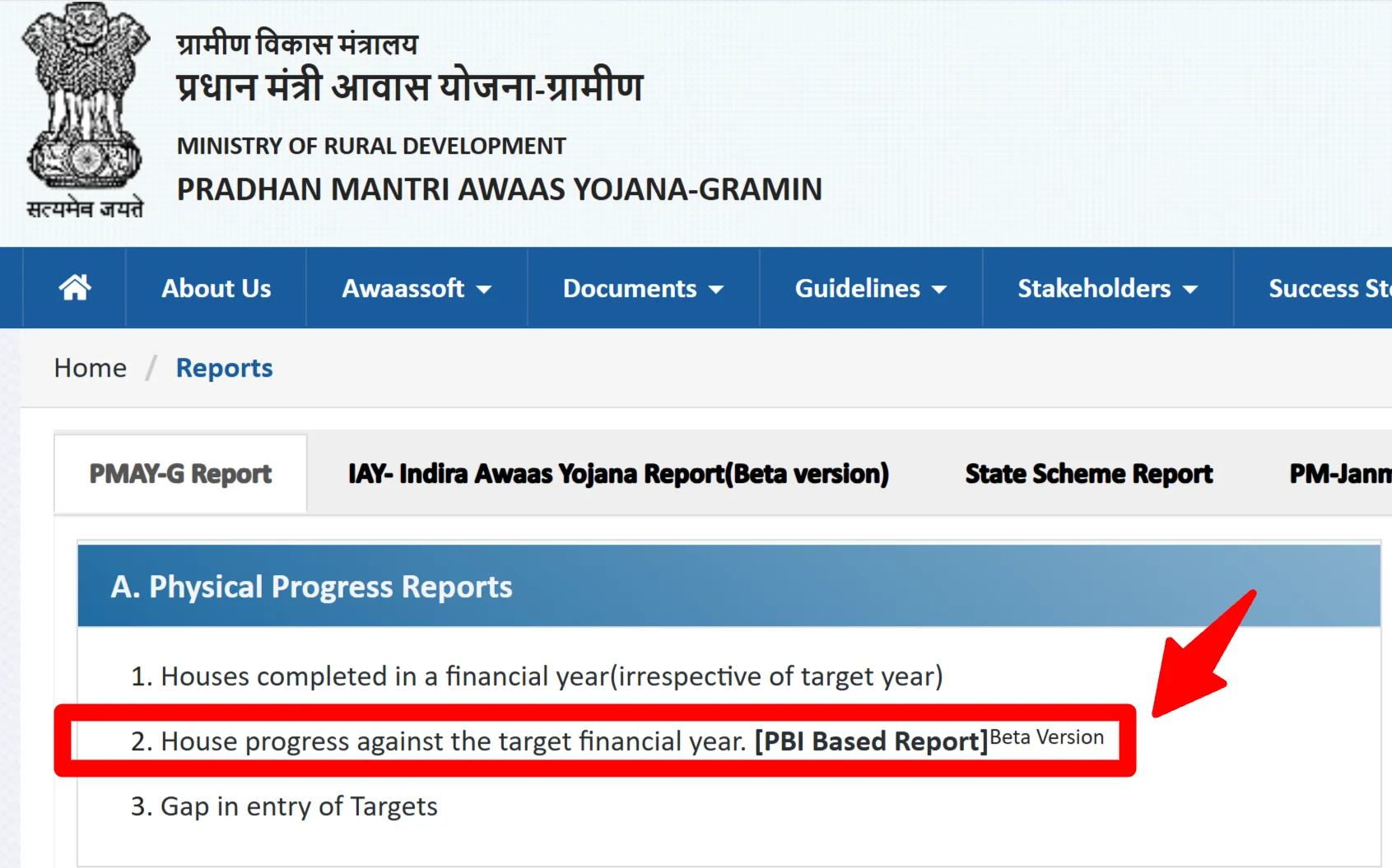
STEP 1: Visit the official PMAY-G website at pmayg.nic.in and click on the “Report” section as image shown below.

STEP 2: After that, a new window is open in which you have to click on the “House progress against the target financial year” option under the ‘Social Audit Reports’ section as image shown below.
STEP 3: Next candidates have to fill the fields in the “Selection Filters“:
- Firstly candidates need to select the year (like 2026-2027 in fig.) for which they want to check the PM Awas Yojana Gramin list in the 1st option.
- Then applicants are required to select “Pradhan Mantri Awaas Yojana Gramin” in the 2nd option.
- Afterward, candidates need to select the “Name of State” in the 3rd option.
- Then candidates can select the “District” name in the 4th option.
- Applicants can then select the “Block” name in the 5th option.
- Finally, applicants need to select the “Panchayat” name in the 6th option.

STEP 4: Next candidates can click at the “Submit” button to open the Pradhan Mantri Awas Yojana Gramin list of beneficiaries.

STEP 5: Here candidates can check village name, registration number, beneficiary name, name of father or mother, house allotted to, sanction number, sanctioned amount, installment paid, amount released and house status in the PMAY G list of beneficiaries.
Download PDF of PMAYG 2026 List of Beneficiaries – Gram Panchayat Wise
Candidates can download the PM Awas Yojana Gramin beneficiary list 2026 in Excel or PDF format by clicking the “Download Excel” or “Download PDF” option. However, the government does not provide one single PDF containing the complete list for an entire state.
How to Check Name in PMAY-G beneficiary list 2026 without registration No.
If any person do not wants to enter their registration number, then they can perform name find without registration number. For this purpose, applicants will have to click at the “Advance Search” tab. Then the name find page without registration number will appear as follows:

Here applicants can enter their state, district, block, panchayat, scheme name, FY and can perform search by following methods:
- Search by Name
- Search by BPL Number
- Account Number
- Search by Sanction Order
- Search by Father / Husband Name
Pradhan Mantri Awas Yojana Urban (PMAY-U) list – How to Check
To check whether you have made it to the ultimate list of Pradhan Mantri Awas Yojana Urban (PMAY-U), follow the below-mentioned steps:
- Visit the official website of PMAY(U) (https://pmaymis.gov.in/)
- Go To the ‘Search Beneficiary’ option and choose the ‘Search by Name’ option from the drop-down menu.
- Enter the first 3 characters of your name mentioned in the form and click on ‘Show’.
- Once clicked, the results will show on the screen, check the screen and look out for your name and further details.
If you’re also an eligible candidate and need to avail yourself of the advantage of this scheme, then you need to collect all the required information before filling out the PM Awas Yojana application form.
PMAY State Wise House Completion Report 2026
| #SNo | State Name | Houses Completed For 2016-17 |
|---|---|---|
| Total | 4096644 | |
| 1 | ARUNACHAL PRADESH | 8991 |
| 2 | ASSAM | 207302 |
| 3 | BIHAR | 627645 |
| 4 | CHHATTISGARH | 229592 |
| 5 | GOA | 243 |
| 6 | GUJARAT | 111294 |
| 7 | HARYANA | 11572 |
| 8 | HIMACHAL PRADESH | 4689 |
| 9 | JAMMU AND KASHMIR | 14298 |
| 10 | JHARKHAND | 228446 |
| 11 | KERALA | 16189 |
| 12 | MADHYA PRADESH | 438631 |
| 13 | MAHARASHTRA | 218900 |
| 14 | MANIPUR | 9727 |
| 15 | MEGHALAYA | 16978 |
| 16 | MIZORAM | 4806 |
| 17 | NAGALAND | 4239 |
| 18 | ODISHA | 383075 |
| 19 | PUNJAB | 9914 |
| 20 | RAJASTHAN | 248201 |
| 21 | SIKKIM | 1074 |
| 22 | TAMIL NADU | 161216 |
| 23 | TRIPURA | 23637 |
| 24 | UTTAR PRADESH | 568710 |
| 25 | UTTARAKHAND | 8462 |
| 26 | WEST BENGAL | 427857 |
| 27 | ANDAMAN AND NICOBAR | 190 |
| 28 | DADRA AND NAGAR HAVELI | 270 |
| 29 | DAMAN AND DIU | 0 |
| 30 | LAKSHADWEEP | 45 |
| 31 | PUDUCHERRY | 0 |
| 32 | ANDHRA PRADESH | 41610 |
| 33 | KARNATAKA | 68841 |
| 34 | TELANGANA | 0 |
| 35 | LADAKH | 0 |
| Total | 4096644 |