Instant eAadhaar Download Online from UIDAI - Summary
Unique Identification Authority of India (UIDAI) allows users to download their Aadhaar card anytime from its official website. You can get your Aadhaar using your Aadhaar number, enrollment ID, VID, or mobile OTP. The downloaded e-Aadhaar card is a valid and secure digital copy that you can use for government services, bank verification, and other official work. This helps you access your Aadhaar card even if you have lost or misplaced the physical copy.
How to Download e-Aadhaar Card Online: Step-by-Step Guide
To download and print your e-Aadhaar card online, simply follow these easy steps:
Step 1: Go to the Aadhaar official website, https://uidai.gov.in/.
Step 2: After reaching the official website, navigate to “My Section” and click on “Download Aadhaar” as shown in the image below.
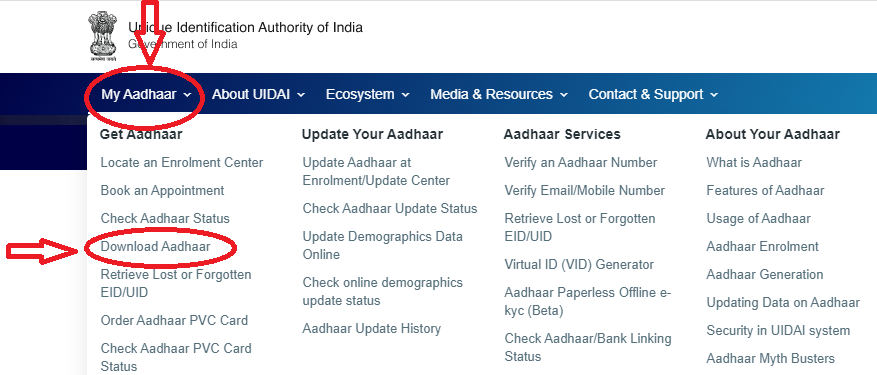
Step 3: A new window will open with three options to download your E-Aadhaar Card Online PDF: Aadhaar Number, Enrollment ID, and Virtual ID (VID). Select the Aadhaar Number option for this process.
Step 4: Choose the “Aadhaar Number” option under the “I Have” section as shown in the image below.
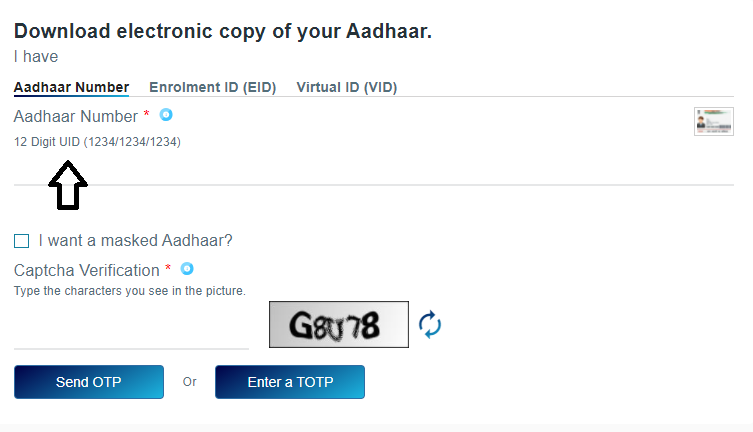
Step 5: Enter the 12-digit Aadhaar Number. If you want to download a Masked Aadhaar, click on the ‘I want a masked Aadhaar’ option.
Step 6: Enter the Captcha Verification Code and then click on “Send OTP” to receive a one-time password on your registered mobile number.
Step 7: Enter the OTP that you receive on your phone.
Step 8: Complete the survey and click “Verify And Download” to download your electronic Aadhaar copy.
Steps to Download e-Aadhaar Card by Virtual ID (VID)
Downloading your Aadhaar number through the Virtual ID is a new feature on UIDAI’s portal. Here are the simple steps to download your Aadhaar card for free using the Virtual ID:
Step 1: Visit www.uidai.gov.in.
Step 2: Select the VID option from the “I Have” section.
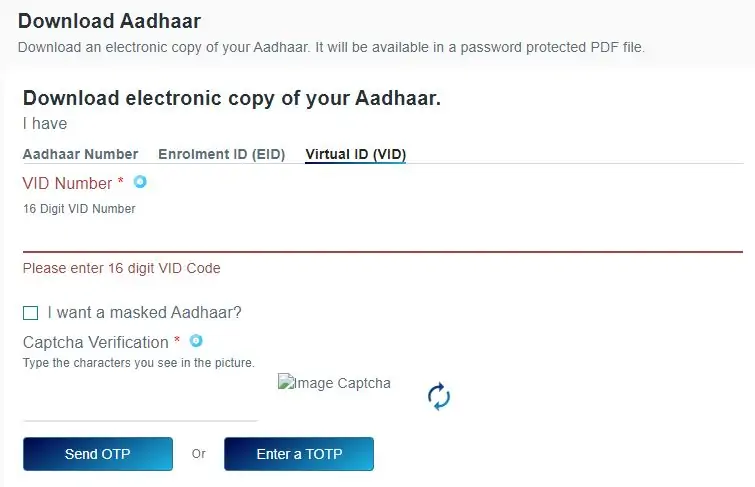
Step 3: Enter your virtual ID, full name, pin code, and the security code.
Step 4: Now click “Send OTP” to generate the OTP.
Step 5: Alternatively, you can use the TOTP feature for authentication.
Step 6: Your e-Aadhaar will download to your device.
Step 7: You can open it by entering the Aadhaar card password.
Step 8: Enter the 8-digit password to access the PDF file – it is the first four letters of your name in CAPITALS followed by your “Year of Birth”.
E-Aadhaar Card Download by Using Enrolment Number (EID)
If you have not received your Aadhaar card yet or have forgotten your Aadhaar number, you can still download your e-Aadhaar card by entering your Aadhaar Enrolment Number (EID). Follow these steps for e-Aadhaar card download using the enrolment number:
Step 1: Visit www.uidai.gov.in.
Step 2: Click on the “Download Aadhaar” option.
Step 3: Enter your 14-digit enrolment ID number and the corresponding 14-digit date and time values.
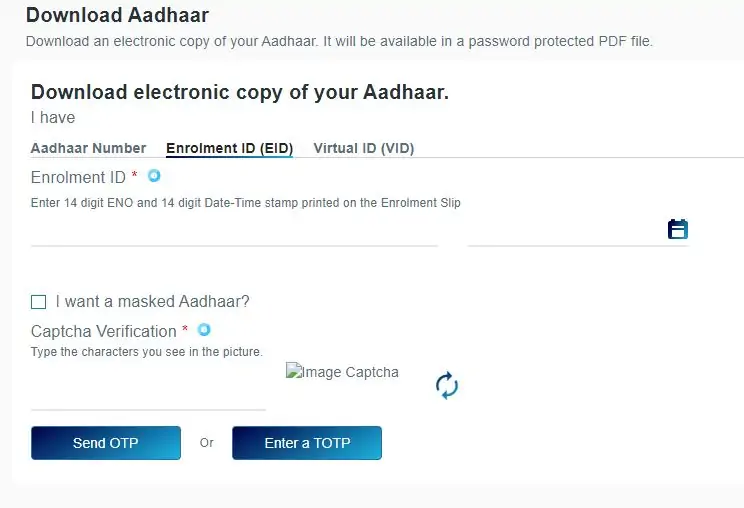
E Aadhaar Card Download PDF
Step 4: Provide your full name, pin code, and the image captcha code.
Step 5: Click “Request OTP” to generate the OTP.
Step 6: Press the “Confirm” button.
Step 7: You will get the OTP on your registered mobile number.
Step 8: Enter the OTP & click on the “Download Aadhaar” option.
Step 9: Now you can easily download your electronic copy of the Aadhaar Card. Don’t forget to save it in a safe place! 😊